AI Max Becomes Default in Google Ads Sept. 1
TL;DR: From September 1, 2026, Google auto-upgrades Search campaigns to AI Max if they use automatically created assets or the campaign-level broad match setting, and campaigns using neither are not upgraded. Automatically created assets get search term matching and text customization, while campaign-level broad match gets search term matching. If a campaign has been upgraded, audit its search terms and cost per conversion against your pre-upgrade baseline and review its AI Max settings. Search terms reporting stays available either way.
Update, October 5, 2026: Google's announcement said these upgrades would start in September 2026 and that it expected them to conclude by the end of September (Google's announcement). I haven't found a source confirming the rollout has finished for every account, so check each campaign's settings rather than assuming. Dynamic Search Ads were handled separately and their auto-upgrade was pushed to February 2027, per the same page.
From September 1, 2026, Google automatically upgrades Search campaigns to AI Max if they use either automatically created assets or the campaign-level broad match setting. If your campaigns use neither, nothing happens. If they use one or both, features get switched on for you unless you acted first.
Google emailed affected advertisers in early August. If you got that email, this applies to you. If you didn't, it's still worth checking, because the trigger is a campaign setting rather than an account-level opt-in and it's easy to have one campaign using it without remembering.
What actually gets turned on
The upgrade isn't one-size-fits-all. What you end up with depends on which setting triggered it.
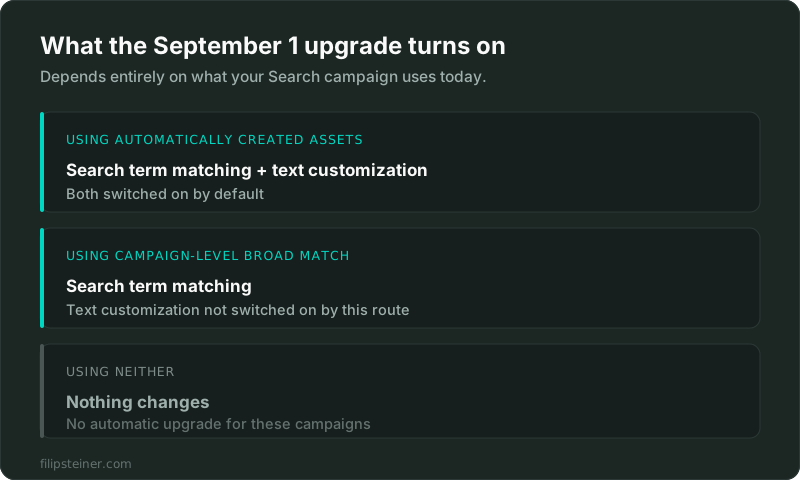
- Campaigns using automatically created assets get AI Max with search term matching and text customization enabled.
- Campaigns using the campaign-level broad match setting get AI Max with search term matching enabled.
- Campaigns using neither are not upgraded.
Google's framing is that this mirrors your current configuration rather than expanding it, since automatically created assets and text customization do broadly similar jobs, as do campaign-level broad match and search term matching. That's a fair description of the intent. Whether it behaves identically in your account is the part worth verifying yourself.
What AI Max actually is
AI Max isn't a new campaign type. It's a bundle of three features that sit on top of a standard Search campaign:
- Search term matching expands beyond your keywords using broad match and keywordless technology, to reach queries your keyword list wouldn't have caught.
- Text customization rewrites and tailors headlines and descriptions based on the query and the user.
- Final URL expansion sends people to whichever page on your site Google judges most relevant, instead of the final URL you set.
Note that the auto-upgrade only enables the first two, depending on your trigger. Final URL expansion is part of AI Max but isn't described as part of what gets switched on automatically. Worth confirming in your own settings after the upgrade rather than assuming either way.
What you keep control of
This is the part that gets lost in the "Google is taking over your account" reaction. AI Max keeps a real set of controls:
- Brand exclusions, so you decide which brands you do and don't want to appear for.
- Locations of interest, on top of standard location targeting.
- URL inclusions and exclusions, which matter a lot if final URL expansion is on. You can keep it away from your blog, your careers page, or anything else that isn't a landing page.
- Text guidelines, including term exclusions and messaging restrictions, so text customization stays inside your brand voice.
- Search terms reporting, so you can still see what queries you're actually paying for.
That last one is the important one. The main risk with looser matching is paying for queries that were never going to convert, and the search terms report is how you catch that. It doesn't go away.
What to check now
You have three options, and keeping the upgraded setup as it is counts as one of them.
- Keep it, then audit. Reasonable if your account is well built and you're watching it. Check search terms and cost per conversion against the weeks before the upgrade.
- Take control of campaigns that haven't been upgraded yet. Google's schedule ran through the end of September, so check whether any campaign still shows the old setting. Turning AI Max on yourself means you choose the settings rather than getting Google's defaults. This is the option I'd pick for most accounts that are still waiting.
- Turn off the trigger setting. Google's guidance before the rollout was that switching off automatically created assets or campaign-level broad match meant the campaign wasn't upgraded. I haven't confirmed whether that still holds now that the rollout is underway or finished, so check Google's documentation before relying on it.
Whichever you choose, do these two things:
- Note the date in your account annotations. When you're comparing September to August, you'll want to know exactly where the line is. Same advice as the bid target enforcement change on August 17, and for the same reason.
- Pull your pre-upgrade baseline. Cost per conversion, conversion rate, and search terms for the 28 days before each campaign was upgraded. Without that, you can't tell whether anything actually changed.
If you'd rather someone just checked which of your campaigns are affected and what to do about each one, that's a quick job and I'm happy to do it.
Should you actually be worried?
Honestly, it depends on how tightly your account is built.
If you're running exact and phrase match with a well-maintained negative keyword list, and you deliberately avoided broad match, then looser matching is a real change in behaviour and you should treat it seriously. Test it rather than accept it by default.
If you're already running campaign-level broad match and automatically created assets, you've effectively opted into this way of working already. The upgrade is closer to a rename than a reinvention, and the practical impact should be small.
The scenario I'd watch most closely is a small local account with a modest budget and a narrow service area. Broader matching on a small budget can pull spend toward loosely related queries fast, and there's less room to absorb that than in a large account. If that's you, a settings review is worth the hour.
One more thing worth saying plainly: Google's own figure for AI Max is 14% more conversions at a similar CPA or ROAS, from its internal data on non-retail advertisers in 2025. That's a vendor statistic about its own product, not an independent result, and it's an average across accounts that look nothing like each other. It's a reason to test, not a reason to assume.
Frequently asked questions
What is AI Max in Google Ads? It's a set of features for Search campaigns, not a new campaign type. It combines search term matching, text customization of headlines and descriptions, and final URL expansion.
Which campaigns are upgraded from September 1, 2026? Search campaigns using automatically created assets, or the campaign-level broad match setting, or both. Campaigns using neither are not affected.
Can I stop my campaigns being upgraded to AI Max? Google's guidance before the rollout was that turning off automatically created assets or the campaign-level broad match setting removes the trigger, and that you could enable AI Max yourself to control the configuration. If a campaign has already been upgraded, review its AI Max settings in the campaign instead.
Does AI Max replace my keywords? No. Search term matching expands beyond your keyword list rather than replacing it, and your existing keywords and match types stay in the campaign.
Will AI Max change my ad copy? If text customization is enabled, yes, headlines and descriptions can be tailored automatically. Text guidelines and term exclusions let you constrain what it's allowed to say.
Can I still see which search terms I paid for? Yes. The search terms report still works, and it's the main thing to watch after the upgrade.
Google's own documentation is About AI Max for Search campaigns.
If you'd rather not spend the next few weeks watching your account for surprises, Google Ads management is exactly that job. And if you just want to know whether your account is in good shape after this change, a PPC account audit will tell you.
Related posts
- Google Ads Drops Language TargetingThe campaign-level language targeting setting disappears from Search campaigns and Performance Max's Search portion. Here's what actually changes.
- Google Ads Now Bids to Your Actual TargetStarting August 17, 2026, Google Ads bids up to your actual CPA/ROAS target instead of undershooting it. Here's what that means for your budget.
- Smart Bidding Learning Phase: 50 ConversionsGoogle's Smart Bidding guidance is shifting from weeks to a conversion count. Here's what that actually means for low-volume accounts.
Related services
Questions about how this affects your account?
Let's talk