LSA Account Disappeared? Here's Where It Went
TL;DR: If your Local Services Ads account or dashboard has disappeared, Google is probably migrating it into Google Ads as a Performance Max campaign with pay-per-lead goals. Google says logging in to the old LSA dashboard then redirects you to Google Ads. Your leads and Google Verified badge carry over, but your performance reports don't. On November 5, 2026, I saw this happen to a house cleaning business in Texas: a new campaign appeared on Target CPA with its $40 target carried over, but its budget showed $5,000/day, not the roughly $178.57/day that $1,250 a week works out to. Check yours.
If you run Local Services Ads (LSA) and the account you knew is gone, you probably haven't been hacked or banned. Google has been moving LSA accounts into the regular Google Ads interface since August 2026, and the first account I manage that moved is a house cleaning business in Texas. Here's what I saw, what Google's documentation says, and what to check if it happens to you.
Where did my LSA account go?
Per Google's migration page, existing Local Services Ads campaigns are being automatically migrated into a specialized Performance Max campaign type built for pay-per-lead goals. After your account migrates, you can no longer use the original LSA dashboard. Google says logging in to it on or after your migration day redirects you to your campaign overview in Google Ads.
So the account didn't vanish. It moved. The ads still run exclusively on Google Search and Google Maps in the same positions as before, per Google.
What I saw in the first account that moved
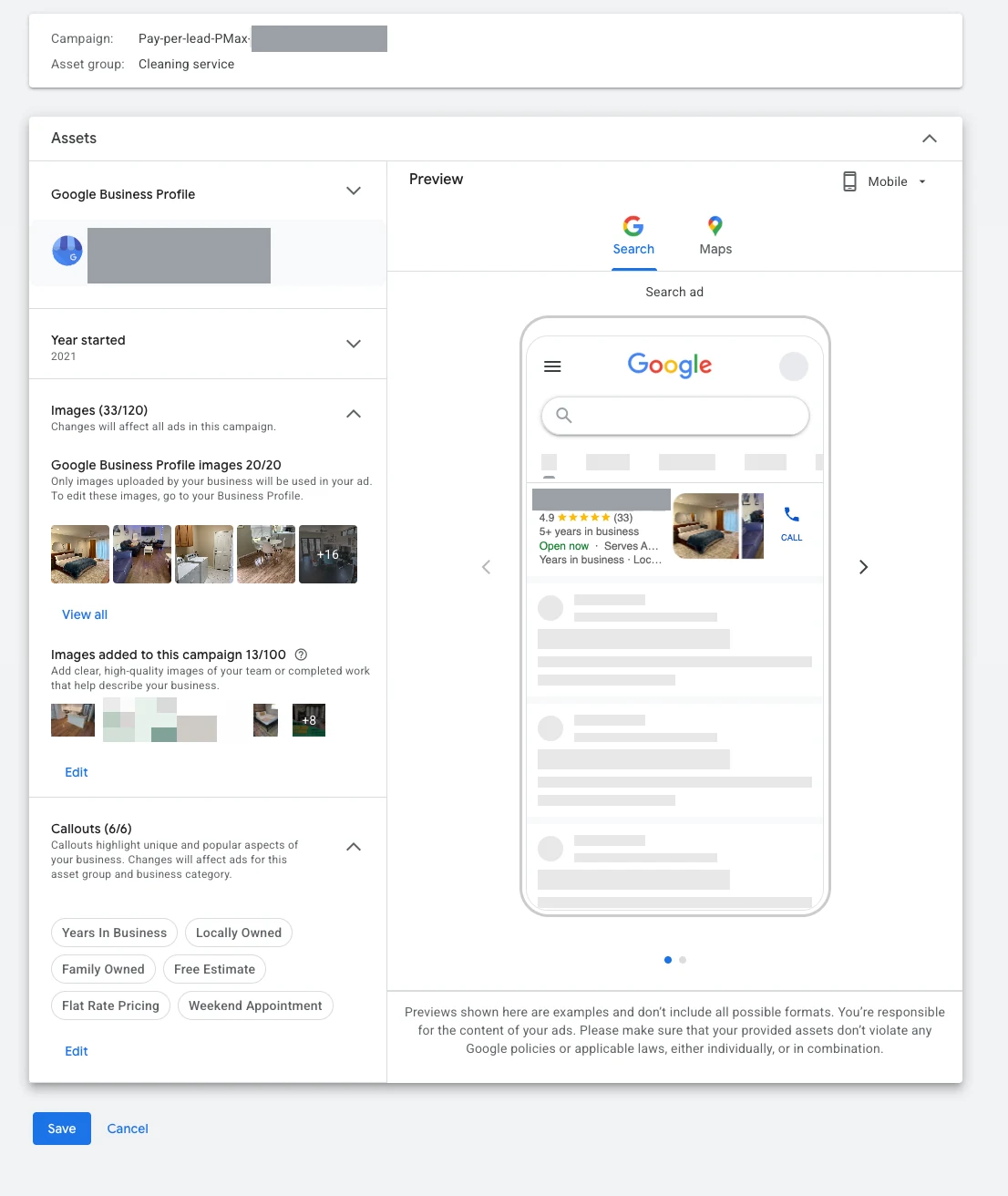
On November 5, 2026, a US house cleaning business I manage in Texas showed up in Google Ads with a new campaign named "Pay-per-lead-PMax-" followed by the business name (hidden in the screenshots). What I could see:
- Campaign type and name. A Performance Max campaign with one asset group, "Cleaning service."
- Bidding. The bid strategy type is Target CPA, and the $40 target carried over from the old LSA setup.
- Status. "Eligible (Learning)" with the bid strategy also learning.
- Early numbers. In the screenshot, 6 impressions, no clicks, and $0.00 cost. Google says to allow up to two weeks for the migration to complete and performance to stabilize.
- Assets. 33 images (20 from the Google Business Profile and 13 added to the campaign) and six callouts.

The budget did not match Google's formula
Google's documentation says the old weekly LSA budget is divided by 7 to set the new daily average. This business's weekly budget was $1,250, which works out to about $178.57 a day. The campaign's budget column shows $5,000.00/day.
I don't know why, and I haven't seen Google explain a difference like this. Google says monthly spend is capped at the daily budget multiplied by 30.4, so the two numbers imply very different ceilings: about $5,428 a month from the formula, against $152,000 from the figure in the screenshot. You still pay per lead, not per click, but the budget is the limit on how many leads Google can try to buy.
Check your migrated budget against your old weekly budget divided by 7 the day your account moves.
What stays the same
Per Google:
- Pay per lead. You pay only for valid leads such as phone calls and messages, not ad clicks.
- Search and Maps only. Unlike a standard Performance Max campaign, these campaigns don't serve on YouTube, Gmail, or the Display Network.
- No keywords. Targeting is based on your service categories and areas.
- Verification and badge. Your verified status and Google Verified badge transfer. Google says insurance and license reverification are no longer required, though it may show a notification if other checks are needed.
What changes
- Where settings live. Budgets, bidding, locations, and service types are under Settings in the Campaigns menu. Photos and callouts are under Assets. Leads and call recordings are under Goals, then Conversions, then Leads.
- Bidding. Manual bidding, such as a maximum cost per lead, is deprecated. Per-vertical Target CPAs are deprecated too: a unified campaign-level target is applied across all verticals.
- Weekly budgets become daily. Weekly budget divided by 7, with monthly spend capped at the daily average times 30.4.
- Business info. Name, address, and hours sync one way from your Google Business Profile and can't be edited in Google Ads. Hours, phone, and minor name changes sync within 24 hours. A significant change to the business name, storefront address, or primary category triggers a 24 to 48 hour review during which the campaign may pause.
- BBB callouts end. Google asks for at least six other callouts instead.
- Lead emails. All users are opted in by default, and at least one user must stay opted in.
- Fewer asset types. Headlines, videos, and sitelinks don't apply to these campaigns.
What happens to your history
Past leads, message history, and older call recordings carry over to the new Leads page. Performance reports do not: past impressions, spend, and cost per lead from the LSA dashboard won't migrate. Google says a download page for historical reports is coming and suggests screenshots if you need them now.
You can't create new pay-per-lead campaigns inside Google Ads yet
Google's FAQ says you can't create new campaigns with pay-per-lead goals directly in Google Ads at this time. To set up additional campaigns or local accounts, you still use g.co/localservices, and Google says campaign creation will come later. Google does say you can keep separate bidding for different business categories by setting up separate campaigns, but check how you'd create them before planning a split.
Your checklist for the day it happens
- Save your LSA performance reports first. Google emails the account administrator 14 days before your migration date, with a reminder 7 days later, but the reports don't move.
- Check the target CPA. Mine carried over exactly, but confirm it's the number you want.
- Check the daily budget against weekly divided by 7, and work out the monthly ceiling (daily times 30.4).
- Review locations, service types, and ad schedule in the campaign settings. These drive which leads you get.
- Add at least six callouts if you relied on the BBB one.
- Set lead notifications so the right person gets every lead.
- Make business name, address, and category changes in your Business Profile, not in Google Ads, and expect a short review.
- Confirm where call and message leads are routed. Google says you can edit the lead phone number in real time in Google Ads.
- Give it up to two weeks before judging cost per lead, and update any reporting that reads from the old LSA dashboard, which you can no longer open.
Who's next
Google's first phase began in August 2026 for select home and storefront service businesses in the United States: plumbing, HVAC, electrical, appliance repair, house cleaning, lawn care, roofing, pest control, and moving. Service-area businesses without storefronts and accounts with custom bidding or booking setups follow in late 2026. Non-US accounts and remaining categories follow in 2027. Google has a dedicated migration support line, +1-844-205-0011, Monday to Friday, 9 AM to 8 PM Eastern.
I covered the plan in more detail in LSA to Performance Max: what's changing.
What's from Google, what I saw, and what's unknown
Stated on Google's help page:
- The migration, its phases, the redirect from the old dashboard, and the notice emails.
- Weekly budget divided by 7, the 30.4 monthly cap, and the bidding changes.
- What carries over (leads, badge, targeting) and what doesn't (reports).
- That new pay-per-lead campaigns can't be created in Google Ads yet.
What I saw in this one account:
- The campaign name pattern, Target CPA, the $40 target carried over, the Learning status, and the early impressions.
- A budget of $5,000.00/day against a $1,250 weekly budget before the move.
Unknown:
- Why the budget differed from Google's formula, and whether other accounts see the same.
- How many accounts have migrated, since Google hasn't published that.
- When the historical report download page will launch.
My take
For most local service businesses this is a change of dashboard, not a change of model. You still pay for leads, not clicks. What you lose is fine control, like manual bids and per-category targets. What you gain is LSA living next to your other campaigns, where budgets, targets, and conversions can be managed together. The businesses that will feel it most run several service categories at very different job values.
Frequently asked questions
Why can't I log in to my Local Services Ads dashboard? If your account has migrated, Google says the original LSA dashboard is no longer accessible and logging in redirects you to your campaign overview in Google Ads. Look for a campaign named something like "Pay-per-lead-PMax" in your Google Ads account.
Did Google delete my Local Services Ads account? Not according to Google. It is migrating existing LSA campaigns automatically into a Performance Max campaign type with pay-per-lead goals. Your targeted locations, service types, budget limits, ad schedule, and photos move over, and your verified status and badge carry over.
Where are my LSA leads after the migration? In Google Ads, under Goals, then Conversions, then Leads. Google says past leads, message history, and call recordings transfer to that page, and it has the features you're used to, including charged status and lead download.
Where did my LSA performance reports go? They don't carry over. Google says past impressions, spend, and ad-level reports won't migrate, and a download page for historical reports is coming. If you need them now, take screenshots.
Will my weekly budget change? Yes. Google says it divides your weekly budget by 7 to set the daily average, with monthly spend capped at that daily figure times 30.4. In the account I saw, the budget didn't match that formula, so check yours when it moves.
Can I still create a new LSA campaign? Not inside Google Ads yet, per Google. You continue to use g.co/localservices to set up additional campaigns or local accounts until creation becomes available in Google Ads.
If your Local Services Ads account has moved, or is about to, and you want someone to check the budget, target, and settings, that's what a one-time LSA migration check is. For ongoing work after that, see Local Services Ads management.
Related posts
- LSA to Performance Max: What's ChangingGoogle is migrating Local Services Ads into Performance Max starting August 2026. Here's what changes, what stays the same, and what to expect.
- Bad Leads and Credits in Local Services AdsHere is how lead credits and disputes actually work in Local Services Ads today, and what to expect when a lead is clearly not valid.
- Google Guaranteed Is Gone, Meet VerifiedThe Google Guarantee and Google Screened badges were retired on October 20, 2025, replaced by one Google Verified checkmark. Here is what changed.
Related services
- LSA Migration Setup & CheckOne-time Local Services Ads migration check inside Google Ads: budget, target CPA, service areas, assets and lead routing reviewed after the move.
- Local Service Ads ManagementLocal Services Ads management for US home service businesses: Google Verified setup, lead quality control, disputes and call tracking.
Questions about how this affects your account?
Let's talk