Where to Find Your LSA Leads in Google Ads
TL;DR: After your Local Services Ads account migrates, you can't open the old LSA dashboard, and your leads move to Google Ads. Go to Goals, then Conversions, then Leads, and open the "Pay-per-lead leads" tab. The page lists each lead with its status, charge status, and type (phone call or message). Google says leads are stored for no more than 60 days, and sensitive data for no more than 30 days, so export what you need.
If your Local Services Ads (LSA) account has moved into Google Ads, the first thing you'll probably look for is your leads. The old LSA dashboard no longer opens, and nothing in the main campaign view lists individual leads. I found them in an account I manage, and this is the path.
How to get to your pay-per-lead leads
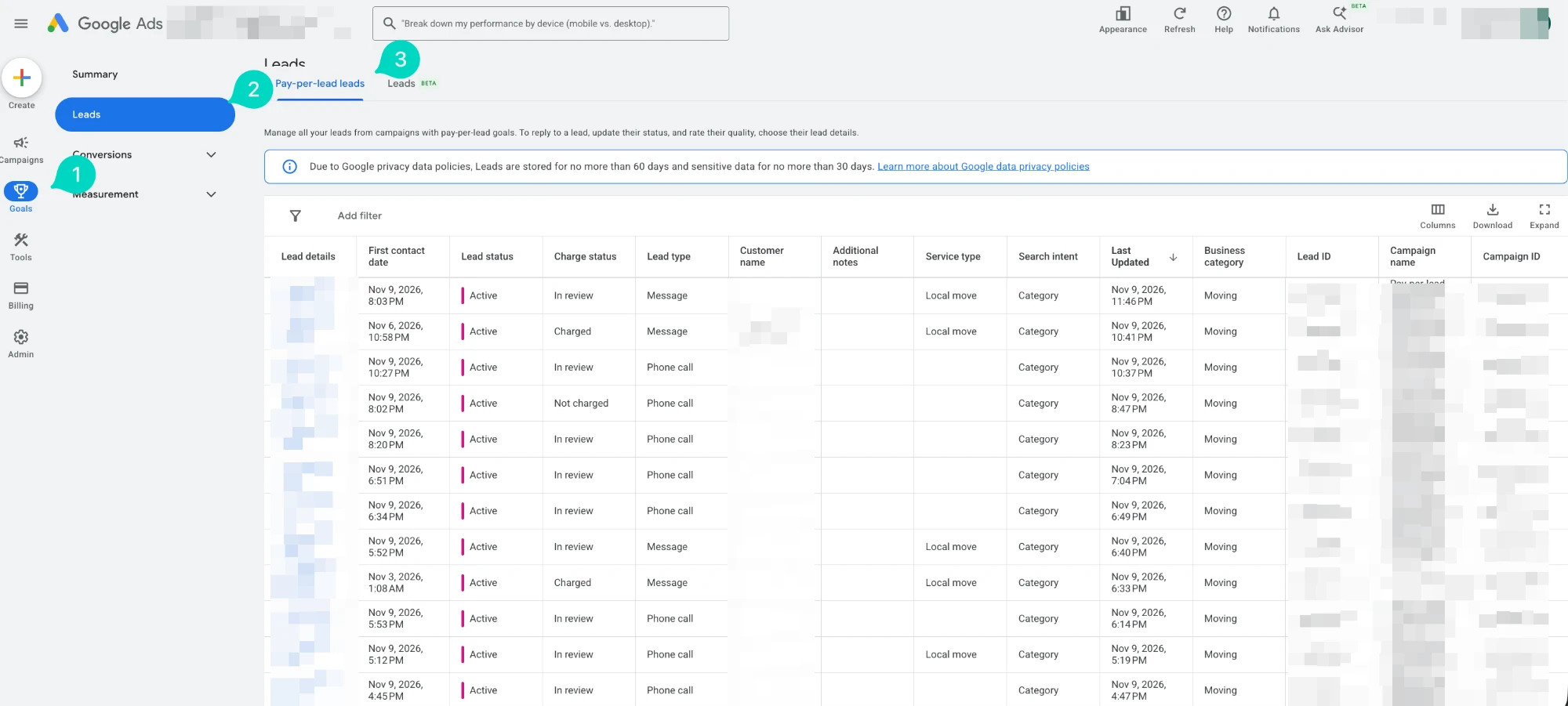
Numbered in the screenshot below:
- Click Goals in the left-hand menu.
- Open Conversions in the submenu, then click Leads.
- Choose the "Pay-per-lead leads" tab at the top of the page. This is the list of leads from your migrated pay-per-lead campaign.
- Ignore the second tab, "Leads (Beta)," unless you use lead form assets. I'm assuming that tab covers leads from other campaign types, since it's a separate view. I didn't open it, so check it yourself if you run lead form assets.
This matches Google's migration page, which says leads and call recordings are under Goals, Conversions, Leads, and that past leads, message history, and older call recordings carry over to this page. I covered the rest of the move in LSA Account Disappeared? Here's Where It Went.
What the leads table shows
Each row is one lead. In the account I looked at, the columns include:
- Lead details and customer name. The contact information for the lead (blurred in my screenshot).
- First contact date and Last updated. When the lead came in and when it last changed.
- Lead status. Mine showed "Active" on every row.
- Charge status. I saw "In review," "Charged," and "Not charged." This is the column to watch if you dispute bad leads. See how bad leads get credited for how that works.
- Lead type. "Phone call" or "Message."
- Service type, search intent, and business category. In my account these showed values like "Local move," "Category," and "Moving." Phone call rows had a blank service type.
- Additional notes, lead ID, campaign name, and campaign ID. Notes are for you to fill in, and the IDs help when you match leads against a CRM or ask Google support about a specific lead.
You can add or remove columns with the Columns button, filter with Add filter, and use Download to export. Expand opens the table at a larger size.
The 60-day retention notice
The banner at the top of the page says: due to Google privacy data policies, leads are stored for no more than 60 days, and sensitive data for no more than 30 days. I read that as the list not being a permanent archive. If you need lead history for reporting, billing disputes, or a CRM, download it regularly instead of assuming it will be there later.
What this page won't tell you
- Cost, impressions, and performance. Google says LSA performance reports don't carry over, and this page lists leads, not spend. Cost and conversion data for the campaign are in the normal campaign reports.
- Whether you've reviewed a lead. Statuses and notes are only as good as what you or your team enter.
What I saw versus what Google says
Stated by Google: Leads, message history, and call recordings are under Goals, Conversions, Leads, and past leads transfer there.
What I saw in this one account: The Pay-per-lead leads tab, the columns above, the three charge statuses, and the 60-day and 30-day retention banner.
Unknown: How long the "Leads (Beta)" tab has existed, exactly what it includes, and whether your menu looks the same, since Google changes the Google Ads interface often.
Frequently asked questions
Where are my LSA leads in Google Ads? Go to Goals, then Conversions, then Leads, and open the "Pay-per-lead leads" tab.
Can I still use the Local Services Ads dashboard? Not after your account migrates. Google says logging in to it on or after your migration day redirects you to your campaign overview in Google Ads.
How long does Google keep my leads? The Leads page says leads are stored for no more than 60 days, and sensitive data for no more than 30 days.
Can I export my leads? The table has a Download button. Use it to keep a copy outside Google Ads.
Why is the service type blank on some leads? In my account, phone call leads had a blank service type while message leads showed one. I don't know if that's by design.
If you want someone to check that your migrated LSA campaign is routing, billing, and reporting leads correctly, that's what a one-time LSA migration check covers. For ongoing work, see Local Services Ads management.
Related posts
- LSA Account Disappeared? Here's Where It WentCan't find your Local Services Ads account? Google is moving LSA into Google Ads as a pay-per-lead Performance Max campaign. Here's what I saw.
- LSA to Performance Max: What's ChangingGoogle is migrating Local Services Ads into Performance Max starting August 2026. Here's what changes, what stays the same, and what to expect.
- Bad Leads and Credits in Local Services AdsHere is how lead credits and disputes actually work in Local Services Ads today, and what to expect when a lead is clearly not valid.
Related services
- LSA Migration Setup & CheckOne-time Local Services Ads migration check inside Google Ads: budget, target CPA, service areas, assets and lead routing reviewed after the move.
- Local Service Ads ManagementLocal Services Ads management for US home service businesses: Google Verified setup, lead quality control, disputes and call tracking.
Questions about how this affects your account?
Let's talk