How to Share Google Ads Account Access
TL;DR: To share Google Ads access, click Admin, select Access and security, click the + button, enter the person's Google account email, choose an access level, and send the invitation. You need Admin access yourself, and access starts once they accept. Standard is enough to run campaigns, but linking Google Analytics requires Admin. For ongoing agency work, a manager account link is usually better than inviting a user, and you keep ownership of the account either way.
To share Google Ads access: click Admin at the bottom of the left-hand menu, select Access and security, click the + button, enter the person's Google account email, choose an access level, and send the invitation. You need Admin access yourself to do this, and their access starts once they accept.
That's the mechanical answer. Whether you think of it as sharing access or giving someone access to your Google Ads account, the two things worth getting right are which access level to pick, and whether you should be inviting a user at all rather than linking a manager account. Both are covered below.
You need Admin access to share access
Only someone with Admin access on the account can invite users, change access levels, or cancel pending invitations. If you open Admin and can't find Access and security, or the + button isn't there, you don't have Admin rights on that account.
This is a common dead end for business owners whose account was originally created by a former agency or a contractor who has since disappeared. If nobody inside your business holds Admin, you can't grant access to anyone, and getting control back means going through Google's account recovery rather than a settings change.
What each Google Ads access level allows
Google Ads has five access levels, and unlike some platforms they are not a simple ladder where each one includes the last. Billing only, in particular, sits off to the side.
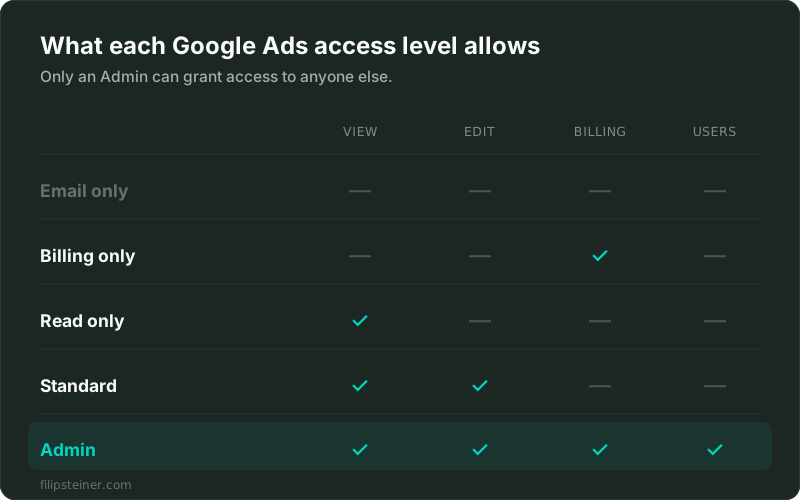
- Email only: receives notification emails and reports, nothing else. They can't open the account.
- Billing only: payment methods, billing details, payments, and billing reports. No campaign access.
- Read only: can view campaigns, use planning tools, and run performance reports. Cannot change anything.
- Standard: everything Read only can do, plus editing campaigns and creating conversions from Google Analytics events.
- Admin: everything Standard can do, plus managing users, linking and unlinking accounts, and linking to Google Analytics.
One nuance the table above simplifies: Read only and Standard users can see billing information, they just can't manage payment methods or make payments. If you want someone handling invoices and nothing else, Billing only is the level built for exactly that.
How to share Google Ads access, step by step
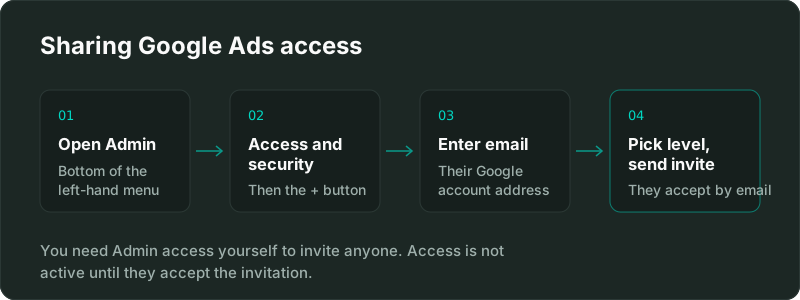
- Click Admin at the bottom of the left-hand navigation menu.
- Select Access and security. You'll see the list of everyone who currently has access.
- Click the + button above that list and enter the email address. It has to be a Google account, though it doesn't have to be a Gmail address.
- Choose the access level from the five above, then send the invitation.
They'll get an email and the access becomes active once they accept it. If someone tells you they still can't see the account, an unaccepted invitation is almost always the reason.
Which access level should you give?
- A stakeholder who just wants to see performance: Read only. They get full visibility and can run reports without any risk of changing a bid.
- Your bookkeeper or finance person: Billing only. They handle payments and never touch campaigns.
- A freelancer or agency actively managing your campaigns: Standard at minimum. Standard is enough to run the account day to day.
- A specialist who also needs to link Google Analytics or connect other accounts: Admin. Linking GA4, Merchant Center, or conversion imports all require Admin.
That last one catches people out. If you hire someone to fix your conversion tracking and give them Standard, they'll hit a wall the moment they try to link Google Analytics to Google Ads, because that specific action is Admin-only. It's a small detail that turns into a day of back-and-forth.
Not sure which level the person you're hiring actually needs? Tell me what you're trying to get done and I'll tell you the minimum access that covers it.
Inviting a user vs linking a manager account
There's a second way to give an agency or freelancer access, and for ongoing work it's usually the better one: a manager account link, often called an MCC link.
Instead of adding an individual person as a user on your account, you link your account to the agency's manager account. The practical differences:
- User invitation ties access to one person's email address. Good for a single individual, an employee, or a stakeholder who wants to look at reports.
- Manager account link connects your account to their whole organisation. Their team can be staffed and re-staffed without you re-issuing invitations every time someone joins or leaves.
Either way, you keep ownership of the account. A manager account link is not a transfer, and you can unlink it yourself whenever you want. That's worth knowing, because "linking my account to an agency" sounds more permanent than it is.
If you're hiring for a one-off project, a user invitation is simpler. If it's ongoing management, the manager account link saves everyone repeated admin.
How to remove Google Ads access
Same path as granting it: Admin, then Access and security, then remove the person or change their access level. To end a manager account link, remove it from the Account access section. Both take effect immediately.
Worth building into your offboarding: when a contractor's work ends or someone leaves the company, their Google Ads access should be removed the same day. Old access sitting unused is one of the most common findings when I audit an inherited account.
Frequently asked questions
Can I give someone access to Google Ads without making them an Admin? Yes, and usually you should. Standard access is enough to run campaigns day to day. Reserve Admin for people who also need to manage users or link other Google products.
Why can't I see Access and security in Google Ads? You don't have Admin access on that account. Only Admins can view or change user access, so someone who has it needs to grant it to you.
Does the person need a Gmail address? No. They need a Google account, which can be created with any work email address.
What's the difference between Standard and Admin access? Standard can edit campaigns. Admin can do everything Standard can, plus manage other users and link the account to Google Analytics, Merchant Center and similar. If your specialist needs to connect GA4, they need Admin.
Is it safer to link a manager account than to share my login? Considerably, and you should never share your login. Both user invitations and manager account links are revocable, tied to identifiable accounts, and leave your ownership intact. A shared password does none of that.
Can I give access to just one campaign? No. Google Ads access is granted at the account level, not per campaign. If you need genuinely separate access, that means separate accounts.
Google's own reference is Manage access to your Google Ads account.
Sharing access is usually step one of a bigger job. If what you actually need is someone to take the account over and make it profitable, that's Google Ads management, and if you're not sure the account is in good shape to begin with, a PPC account audit tells you before you commit to anything.
Granting access to the other platforms works differently: here's how to share Google Tag Manager access, how to share GA4 access, and how to share CallRail access.
Related posts
- How to Share Google Analytics 4 (GA4) AccessShare GA4 access in four steps, what each of the five roles can do, and the difference between account and property level access.
- How to Share Google Tag Manager AccessShare Google Tag Manager access in four steps, plus which of the five permission levels to actually give someone and why it matters.
- How to Share CallRail AccessShare CallRail access in a few steps, what each of the four user types can actually do, and the one permission that catches people off guard.
- Google Ads API Developer Token SunsetGoogle ended Google Ads API developer tokens on September 9, 2026. Access levels now belong to Cloud projects. Here is what changed and who needs to act.
Related services
Questions about how this affects your account?
Let's talk