Track Google Ads Call Assets in CallRail
TL;DR: To track Google Ads call assets in CallRail, create a tracking number with the "Somewhere else" and "Google Ads Assets" options, route it to your business line, then add that number as a call asset in Google Ads under Campaigns, Assets, plus, Call. To get keyword and campaign data in CallRail and count calls as conversions in Google, also turn on call reporting and send call data to CallRail in your Google Ads account settings. CallRail does not post these conversions to Google Ads. Google tracks them itself, so the ad will show a Google forwarding number, not your CallRail number.
This is the setup for calls that come straight from your ad, when someone taps the call button on a call asset (what used to be called a call extension) and never visits your website. It's one of two call setups in Google Ads and CallRail. Calls that start on your website use a different number swap, a website pool, covered in how to track Google Ads website calls in CallRail. For both together, see the full setup overview.
Below is the whole path, with screenshots from a setup I did in a client account, with identifying details removed. It follows CallRail's own Google Ads Assets number article and its Call Details Forwarding article. If you want to know why call assets need their own setup at all, read why call extensions won't track as conversions first.
If you would rather watch than read, here is the whole call asset setup as a short video.
Before you start
- CallRail: access to create tracking numbers in the right company.
- Google Ads: access to edit assets, and access to change account settings for step 3.
- A number to forward to, usually your primary business line.
- A call conversion action in Google Ads. The one in my screenshots is the "Calls from ads" action. Google says the default one counts calls over 60 seconds, and you can change the duration.
Step 1: Create the tracking number in CallRail
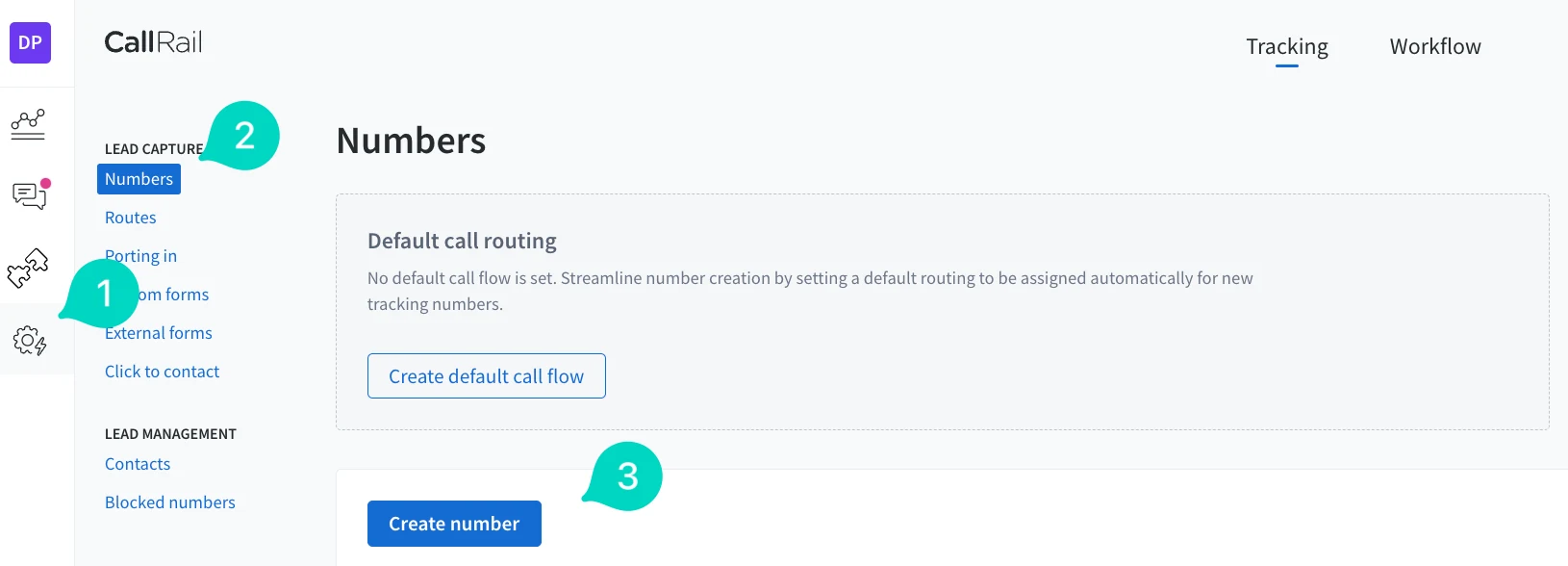
- Open Numbers and click Create number. In CallRail, click the settings gear (1), choose Numbers under Lead Capture (2), then click Create number (3). CallRail's article says you can also start from the homepage.
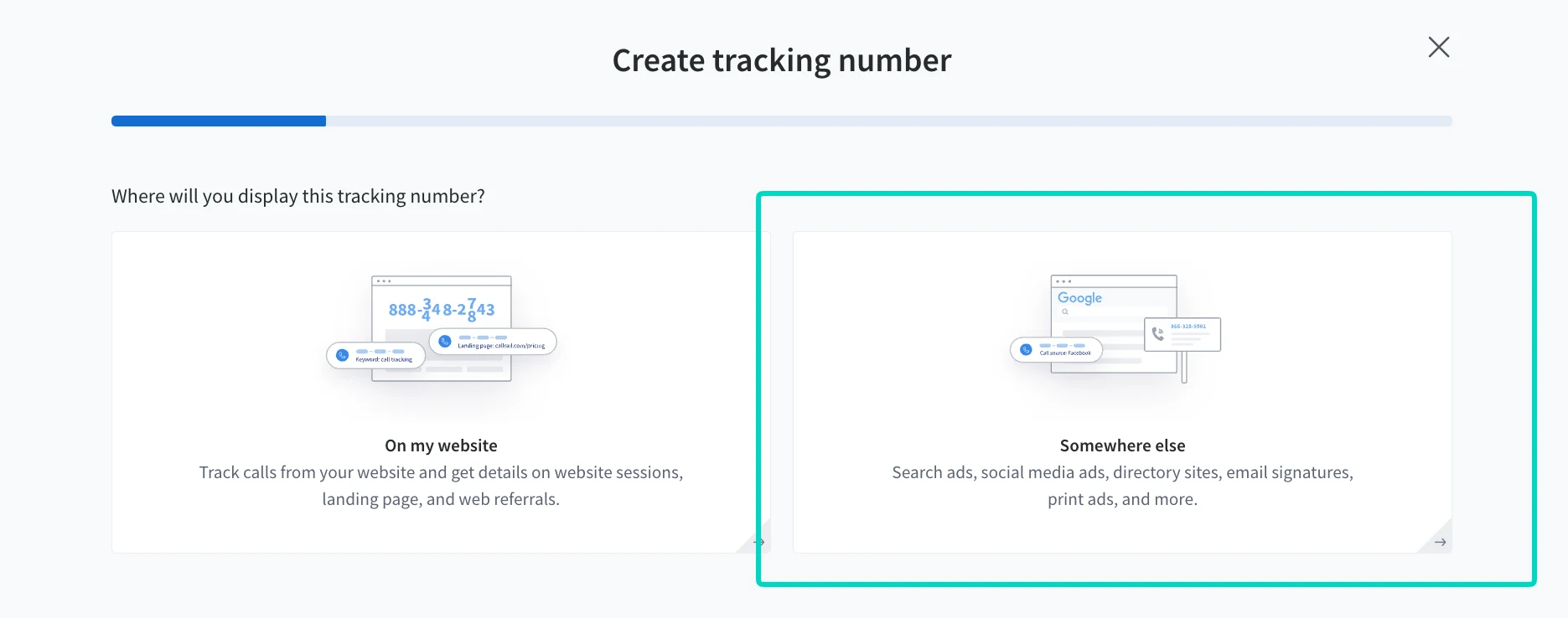
- Choose "Somewhere else." The first question asks where you'll display the number. A website is for the pool setup. A call asset shows in your ad, so pick "Somewhere else," which CallRail describes as search ads, social media ads, directory sites, email signatures, and print.
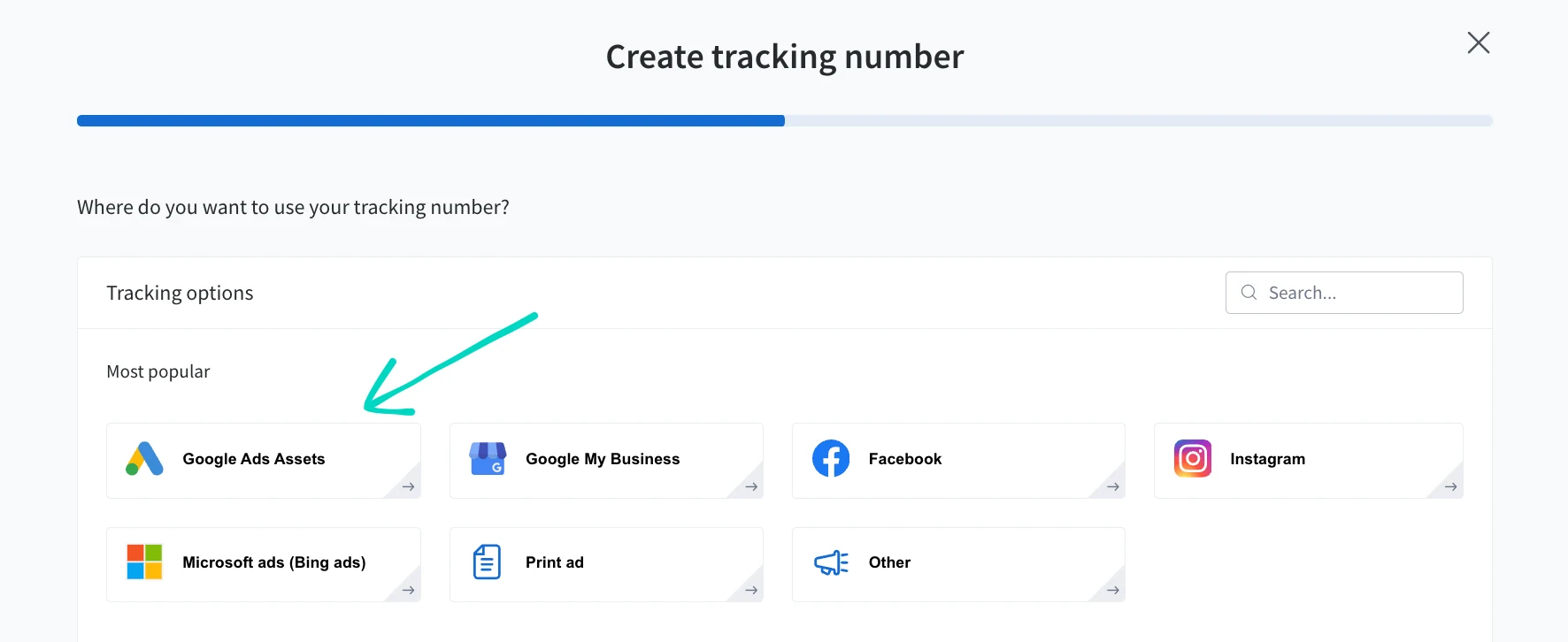
- Choose "Google Ads Assets." It's in the most popular list.
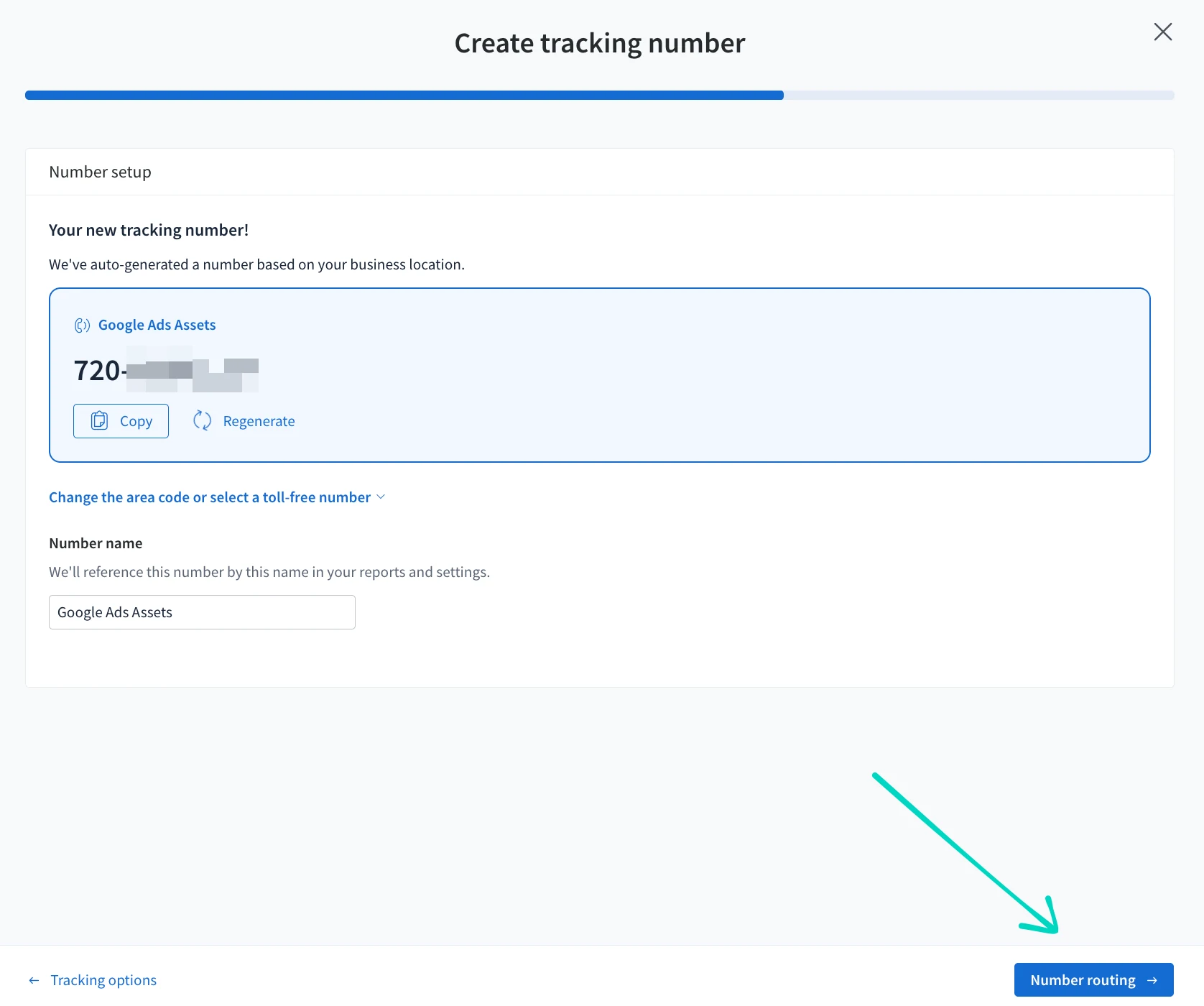
- Pick the number and name it. CallRail auto-generates a number based on your business location. You can copy it, regenerate it, or change the area code or select a toll-free number. The number name appears in your reports and settings, so use something you'll recognize. Then click Number routing.
CallRail says it automatically sets the source of a Google Ads Assets number to "offline," so the JavaScript snippet on your website won't swap it. That keeps these calls separate from any website pool you run for the same business.
- Set the routing, then activate. Under call routing, choose where the calls go. I used "Forward to phone number" with the business line. The other options in the screenshot are "Use Call flow" and "Inbox." Then set your call recording and whisper message. The screenshot also shows message routing, marked New, which forwards text messages to a number that can receive them. Finish with Activate tracking number.
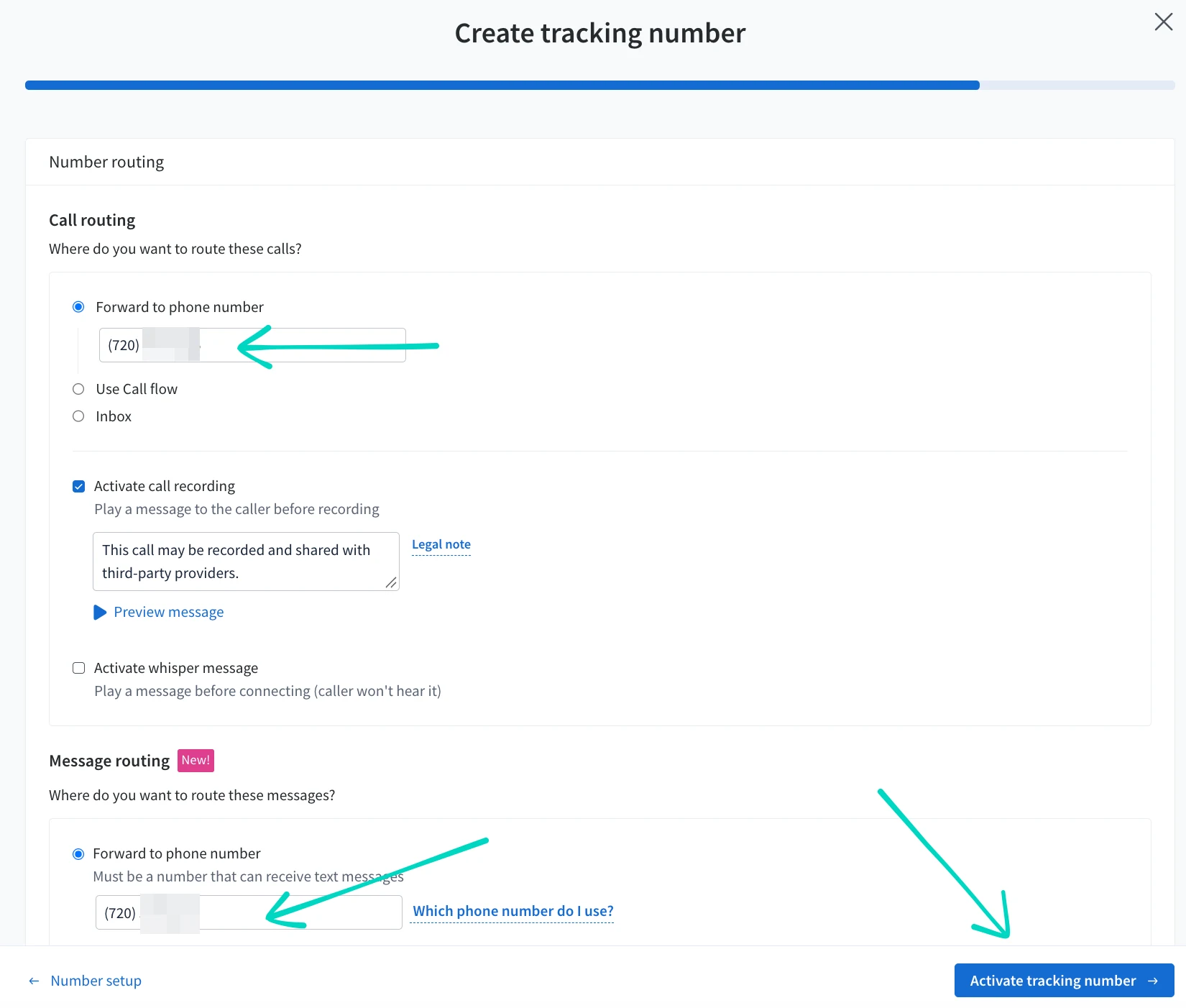
A note on recording: the screenshot shows call recording on with a notice to callers that the call may be recorded and shared with third-party providers. Recording consent rules vary by where your callers are, so check yours with your own counsel and use the "Legal note" link in CallRail.
Step 2: Add the number as a call asset in Google Ads
- Open Assets and filter to Call. In Google Ads, click Campaigns (1), then Assets (2). Select the Call filter (3) and click the plus button (4).
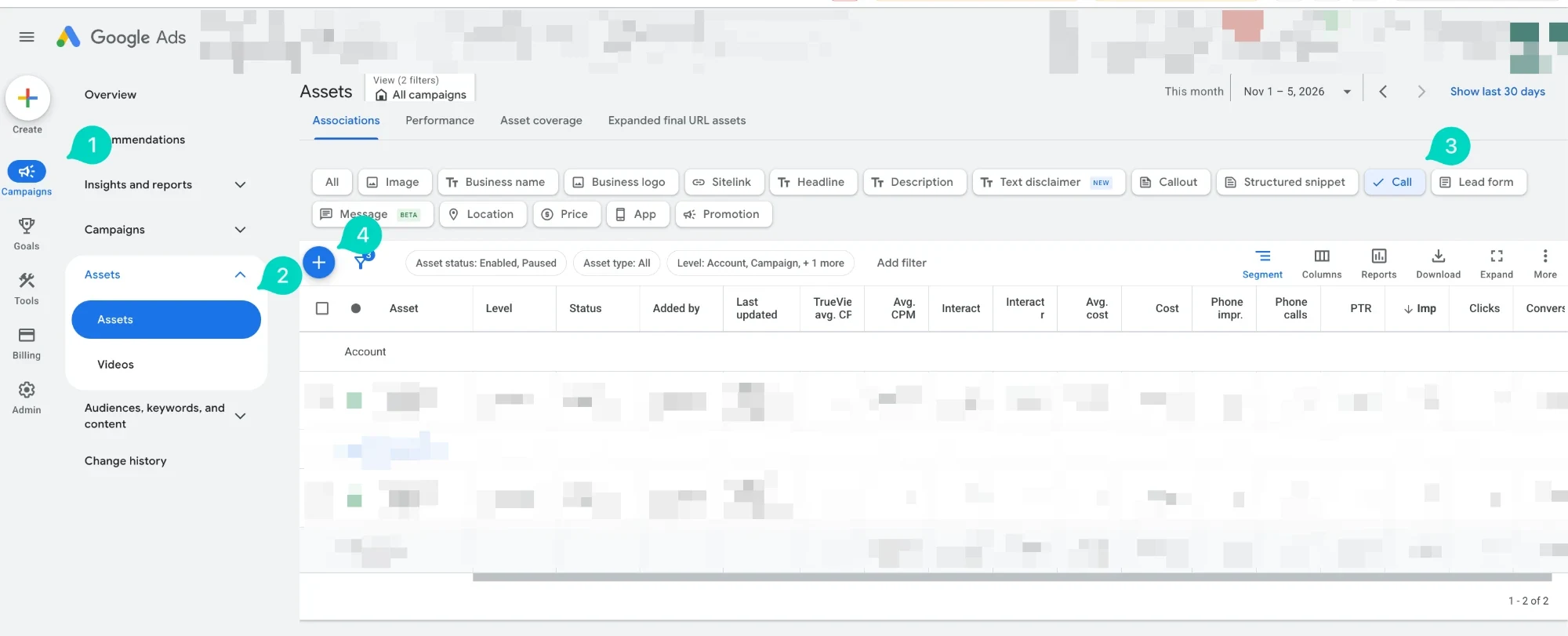
- Choose the level. In the "Add call" dialog, under "Add to," choose Account, Campaign, or Ad group. Google says that when you add call assets at different levels, the most specific one is used, so an ad group call asset overrides a campaign one, and a campaign one overrides an account one.
- Create new or use existing. Choose "Create new" for a new asset. To switch an existing call asset, CallRail says to replace the number currently in it with your new CallRail number.
- Enter the CallRail number. Choose the country, then paste the tracking number you created in step 1 into the phone number field.
- Check the conversion action. My screenshot uses "Use account settings," which applies the account's "Calls from ads" action. Click Save.
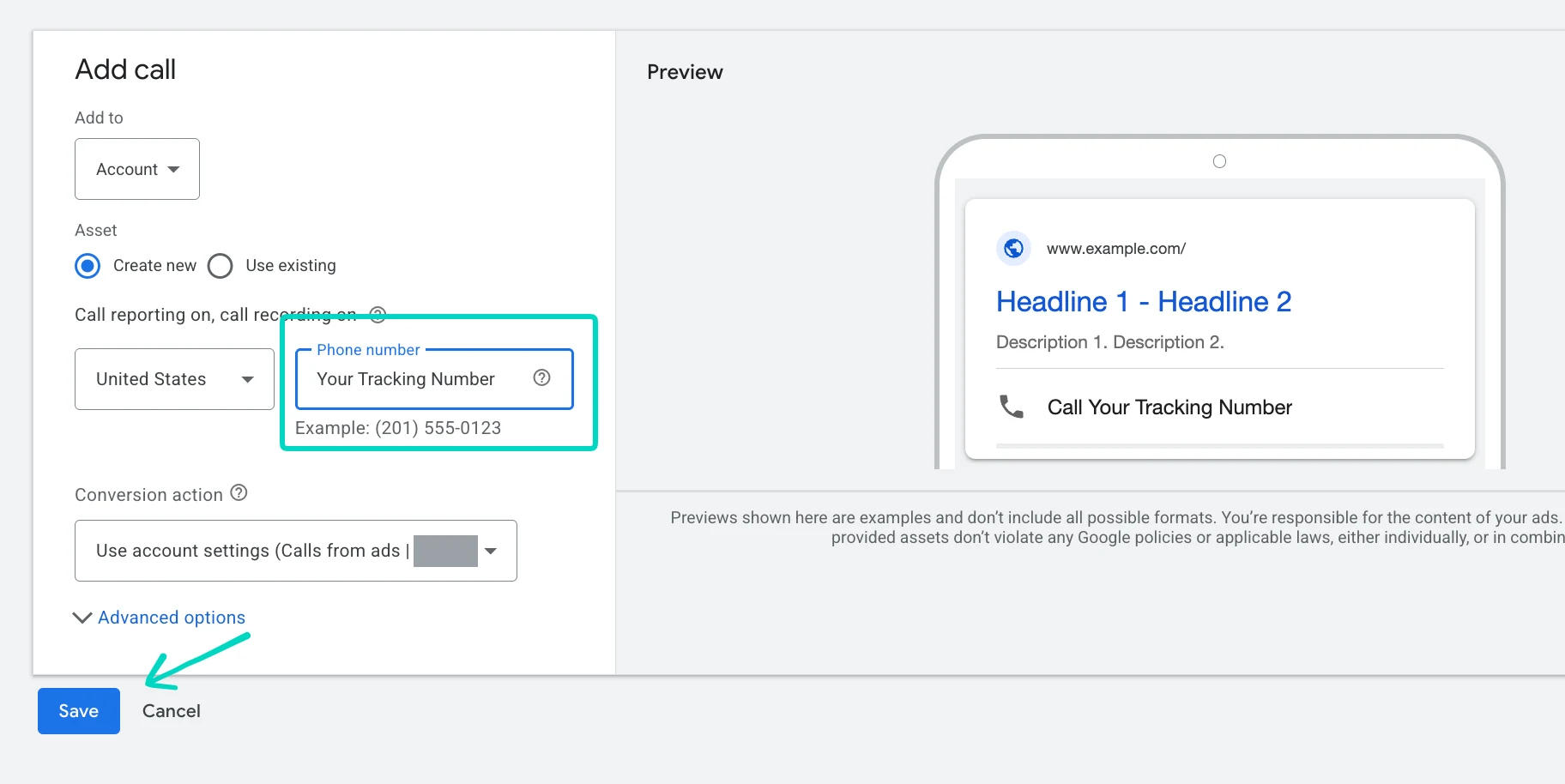
In this account the dialog shows "Call reporting on, call recording on" above the phone number. Those match the Call reporting and Call recording settings in step 3, so I read that line as the account's current state.
If Google disapproves the number as unverified, Google says this can happen when you use dynamic number insertion or third-party call tracking, because it can't verify the number by scanning your website. Its fix is to prove domain ownership by linking Google Search Console to Google Ads, or by adding the Google tag directly to your website's raw HTML, then re-saving the asset. Google says the tag can't verify a domain if it's deployed through Google Tag Manager.
Step 3: Turn on call reporting and send call data to CallRail
Google Ads call tracking has two modes, and which one you pick changes what you see:
- Call reporting on. Google assigns a Google forwarding number to your ad and routes the call through it, which lets Google track call details and count calls as conversions. The call then goes to the number in your call asset, here your CallRail number. This is the setup CallRail calls Call Details Forwarding.
- Call reporting off. The ad shows your direct number, here your CallRail number, but Google says this prevents Google Ads from tracking calls. CallRail says calls to a Google Ads Assets number won't report as conversions in Google Ads unless the number is used with its Call Details Forwarding integration.
To use Call Details Forwarding, go to the Call ads section of your account settings in Google Ads:
- Click Admin (1), then Account settings (2).
- Under Call reporting, select On.
- Under Call recording, choose On or Off. The setting text says calls will be recorded and evaluated by AI, and that the quality of your call leads determines which ones are used to improve campaign performance. Google adds that recording may not work for some campaigns because of local laws and industry-specific regulations.
- Under Call details forwarding, select On. Google describes it as sending performance data from ads using a dynamic tracking number to a third-party call analytics provider.
- Under Call analytics provider, choose CallRail.
- Click Save.
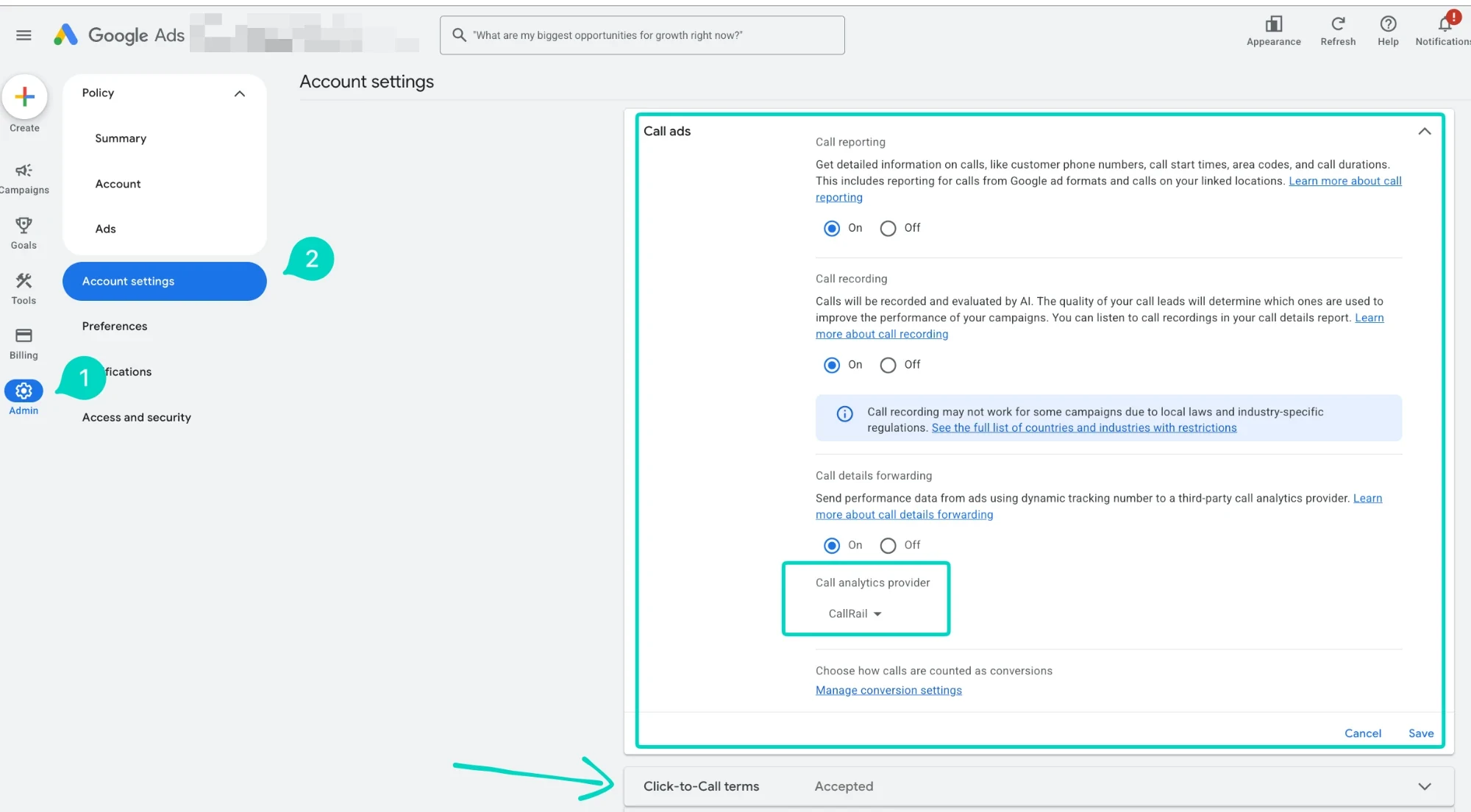
CallRail's own article words the second option as "Send Google Ads data to a Call Reporting provider." The screen in my account labels it Call details forwarding, so go by what you see.
Below the provider, Google also links to "Manage conversion settings" under "Choose how calls are counted as conversions." That's where Google's call conversion rules live, such as the minimum call duration.
CallRail says this requires no prior Google Ads integration and works with any tracking number set as a Google Ads Assets number. It does need the Google Ads integration if you want keywords and campaign names, not just click IDs and campaign IDs.
Step 4: Test it before you trust it
- Call the CallRail number from a phone that isn't your business line. It should ring your forwarding number and play any whisper message or recording notice you set.
- Check CallRail's Activity page. The call should appear against the number you named in step 1.
- Wait a day for keyword data. CallRail says that with an active Google Ads integration, keywords and campaign names populate for these calls the day after they occur. Calls need to be at least 15 seconds long for the enhanced data to be captured.
- Compare counts in Google Ads. Google counts these calls using the call conversion settings in your account, such as minimum duration. CallRail warns those settings can make the Google Ads count differ from the calls CallRail tracked, so a mismatch isn't automatically a bug.
A test call to the CallRail number proves routing and logging. It doesn't prove Google Ads attribution, because that needs a real ad interaction.
Calls that start on your website need the other setup, a website pool. Here it is as a short video, about a minute and a half.
Common problems
- The ad shows a different number than my CallRail number. With call reporting on, that's expected. CallRail says your ads are served with a Google forwarding number that connects to your CallRail tracking numbers.
- The number isn't shown on desktop ads. CallRail says Google forwarding numbers may not show on desktop if the ad group doesn't get a minimum number of clicks in a 4-week period, and your business number is shown instead. There's no minimum on mobile.
- A call has no keyword or campaign data. CallRail says calls where someone copies the number from a mobile ad and dials later don't get this data, because Google shows the CallRail number in the ad instead of replacing it with a forwarding number.
- Calls from my website aren't tracked by this number. It's not meant to. This number serves ad calls only, and CallRail sets its source to offline so your website script leaves it alone.
- Double counting. If you also import call conversions for the same calls, count each call once. Google warns against tracking the same calls with both a "Calls from ads" action and an import action.
Frequently asked questions
Do I need a CallRail number to track Google Ads call assets? If you want calls from your call asset logged in CallRail, yes. CallRail's Google Ads Assets number is the one you enter in the call asset in Google Ads. Google can track call conversions on its own with call reporting, but CallRail won't see the calls unless they go through a CallRail number.
Why does my ad show a different phone number? Because call reporting is on. Google shows a Google forwarding number, routes the call through it, and forwards it to the number in your call asset. Per CallRail, that forwarding number connects to your CallRail tracking number.
Does CallRail send call conversions to Google Ads for call assets? No. CallRail says it doesn't post conversions to Google Ads for Call Details Forwarding calls. Google counts them according to the call conversion settings in your Google Ads account.
What does "Somewhere else" mean in CallRail? It's the answer to where you'll display the number when it's not on your website. CallRail describes it as for search ads, social media ads, directory sites, email signatures, and print. A number on your website uses the website option instead.
How long until keywords show up in CallRail? CallRail says the day after the calls occur, if you have an active Google Ads integration. Calls under 15 seconds don't get the enhanced data.
Can I use this number on my website too? Not as set up here. CallRail sets a Google Ads Assets number's source to offline so the website snippet won't swap it. For website calls, use a separate website pool.
If you'd rather have call tracking set up and checked end to end, including call reporting, conversion actions, and the CallRail connection, that's what my CallRail integration service covers. If you already have it and don't trust the numbers, a tracking audit is the place to start.
Related posts
- CallRail Google Ads Call Tracking: Full SetupGoogle Ads calls come from two places, your website and the ad's call button. Here's how to set up CallRail for both and avoid counting calls twice.
- Track Google Ads Website Calls in CallRailStep by step: build a CallRail website pool for Google Ads visitors, install the snippet, connect Google Ads, and test that calls count as conversions.
- Call Extensions Won't Track as ConversionsCallRail can't capture calls from call extensions, no landing page loads for them. The real fix is Google's own Call Details Forwarding, not a CallRail setting.
- What Is a Google Ads Conversion?A conversion is a specific action you've told Google Ads to count as valuable, not a click or a visit. Here's what counts and how to set one up.
Related services
- CallRail IntegrationCallRail integration with Google Ads and GA4 that ties each phone lead to its campaign and keyword, so bidding learns from real calls.
- Tracking AuditGA4, GTM and conversion tracking audit for US businesses: a written report of what's broken, missing, or double-counted, in priority order.
Questions about how this affects your account?
Let's talk